
On October 8, 2026, Microsoft announced additional ways to bring Dynamics 365 customer information and business capabilities into Copilot and Microsoft Teams.
The announcement introduced 30 prebuilt CRM skills across Dynamics 365 Sales, Customer Service, and Customer Insights, generally available in Copilot Cowork. Microsoft also announced a Dynamics 365 CRM experience in Teams in public preview. Microsoft’s Dynamics 365 announcement
For organizations using CRM, the opportunity is practical: employees may be able to complete more customer-related work within the tools they already use.
This article examines the implementation implications of Microsoft’s announcements, supported by a separate sandbox example using the existing Sales agent. It is not a hands-on review of the new Cowork or Teams experiences.
What was already possible?
Dynamics 365 already extended beyond its main application.
Microsoft’s Sales agent documentation describes retrieving customer insights, drafting sales emails, capturing meeting takeaways, and updating CRM records through Microsoft 365 experiences such as Outlook and Teams. Sales agent capabilities
The October announcement builds on that direction. Accessing CRM information outside a Dynamics screen is established; the newer emphasis is on bringing reusable expertise, customer context, and supported actions together around a complete task.
What has changed—and why does it matter?
1. CRM skills organize capabilities around business tasks
The announced skills package guidance for activities such as investigating deal risks, preparing customer meetings, researching service answers, and drafting responses.
This matters because employees generally think in terms of outcomes: “Help me prepare for this renewal,” or “Explain what is blocking this customer issue.”
Reusable skills can provide a more structured starting point for those requests. The business opportunity is to make useful assistance easier to access, while reducing the need to design every procedure from scratch.
Organizations still need to check whether the packaged skills understand their data and fit their processes.
2. Copilot can coordinate several steps of work
Cowork’s Sales documentation describes planning multistep tasks across Dynamics 365 data and Microsoft 365 context, including email, meetings, and collaboration activity. It also describes requesting confirmation before consequential actions. Sales skills in Cowork
For a renewal, that could mean gathering relevant information, identifying gaps, preparing a briefing, and proposing follow-up actions within one task.
The potential benefit is less manual assembly of context. The condition is equally important: the necessary information must exist, be accessible, and relate to the correct customer.
A well-written briefing cannot compensate for missing service history or an outdated opportunity.
3. Teams can become a shared place for customer context
Microsoft’s announced Teams experience connects a channel to a customer account and brings sales and service context into the conversation, including customer developments and service notifications. This experience was announced in public preview. Microsoft’s Copilot announcement
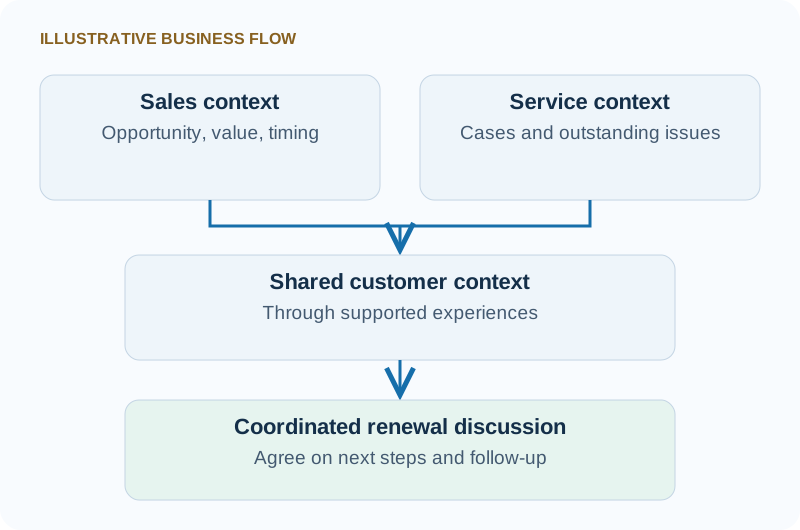
For account teams, the opportunity is a shared understanding of the customer before someone makes a commitment.
Consider a seller discussing a renewal while a service team is handling an unresolved issue. Bringing that context together could help the team agree on the appropriate next step.
Before planning a rollout, check availability in your country or region and confirm the requirements for each experience. Access can depend on licensing, user roles and permissions, administrator settings, and whether a feature is generally available or still in preview. Start with a small pilot to confirm what is available and supported in your environment.
A renewal example: from customer information to a verified update
To examine the broader idea in practice, we ran a controlled test using the Sales agent in Microsoft Copilot, connected to a Dynamics 365 sandbox on October 28, 2026, and repeated the demonstration with neutral sample names on October 29.
The test demonstrates CRM work outside the main application using an existing Sales agent experience. It does not validate the newly announced Cowork skills or Teams experience. The announced capabilities above are documented by Microsoft; the results below are observations from our sandbox.
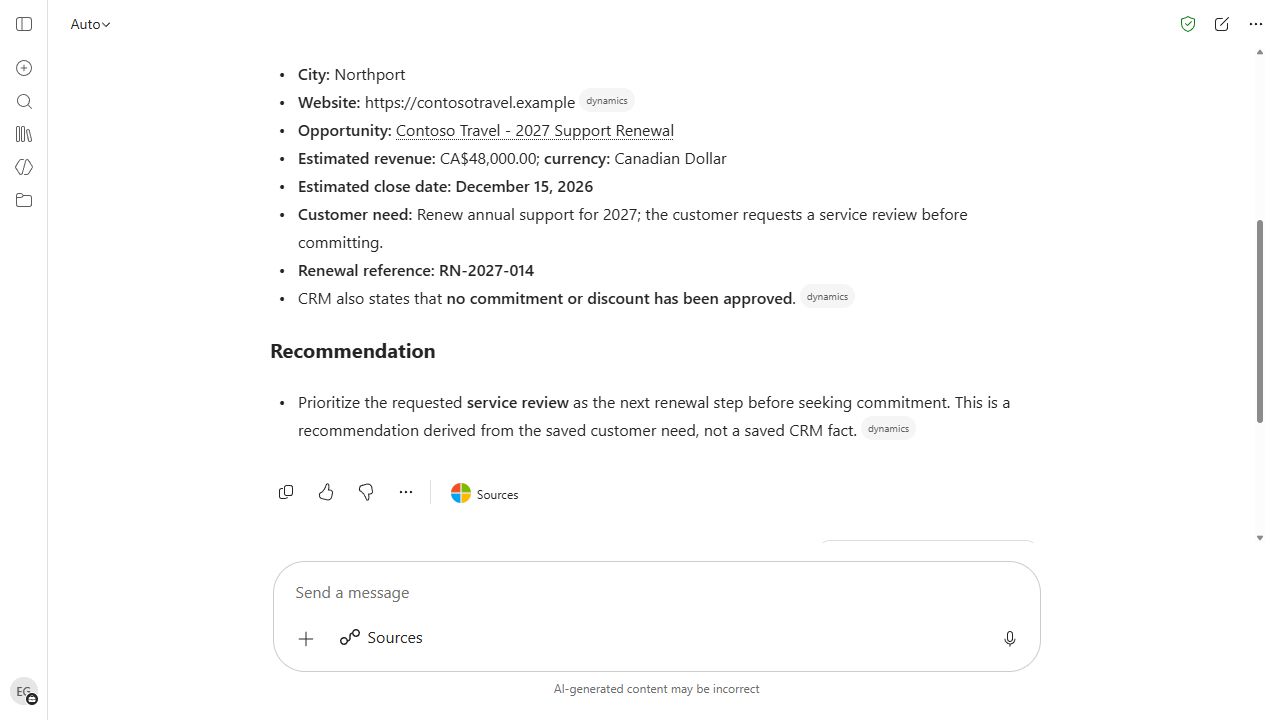
Our fictional sample customer, Contoso Travel, has a linked 2027 Support Renewal opportunity containing:
- Estimated revenue of CAD $48,000.
- An estimated close date of December 15, 2026.
- A customer request for a service review before commitment.
- A renewal reference, RN-2027-014, to help verify retrieval.
Retrieve the information
We supplied the account and opportunity names, but not the field values being checked. This was the exact prompt:
Prepare a concise renewal briefing for Contoso Travel using only CRM records in ATS Learning. Include the account city and website, and the related opportunity Contoso Travel - 2027 Support Renewal: estimated revenue and currency, estimated close date, customer need and renewal reference. Provide CRM record links where available. Distinguish saved facts from recommendations. Do not use email, meetings or the web, and do not change any records.
It returned the saved city, website, amount, date, customer-need text, and reference. In the refreshed demonstration, it supplied links matching both CRM records and separated the saved facts from its recommended next step. In the first run, it had reported that an opportunity link was unavailable—a reminder to verify the evidence returned by each response.
Propose and review a change
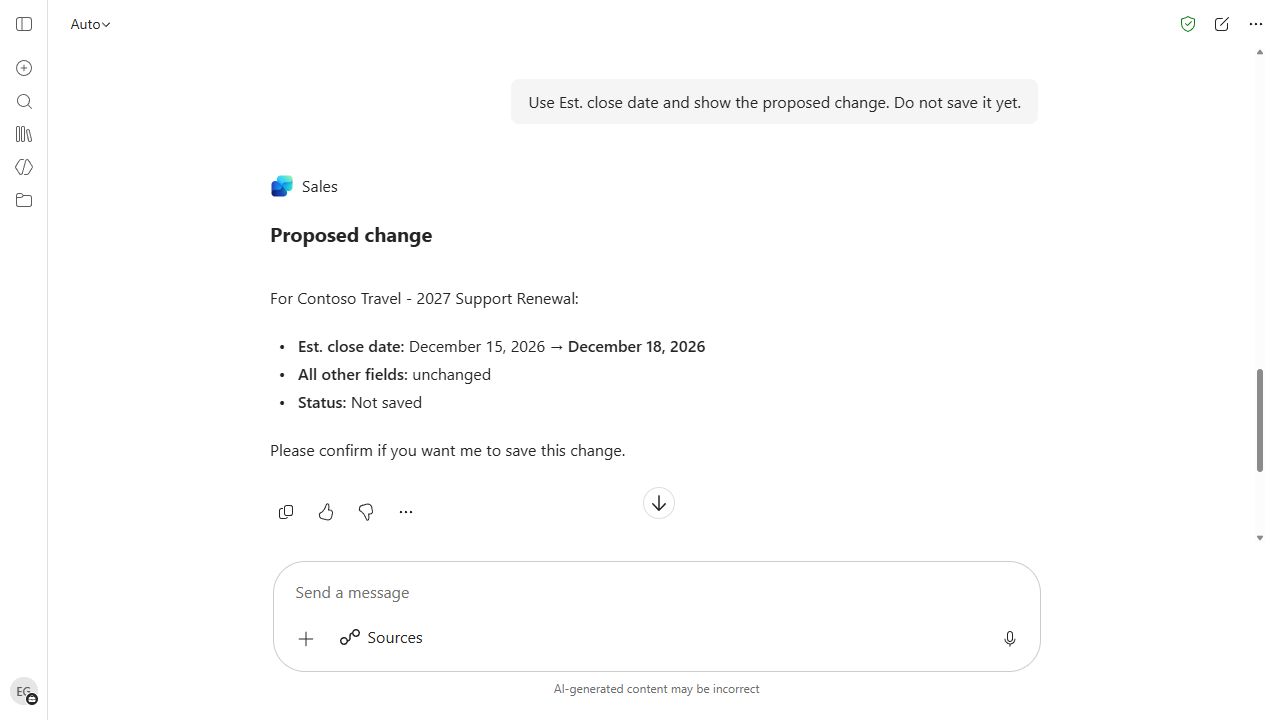
Next, we requested a change from December 15 to December 18, explicitly instructing the agent to present the proposal and wait for confirmation.
In the refreshed demonstration, the agent first asked us to distinguish the estimated close date from the actual close date. After clarification, it showed the current and proposed values, labelled the change as not saved, and requested confirmation.
Verify the saved result
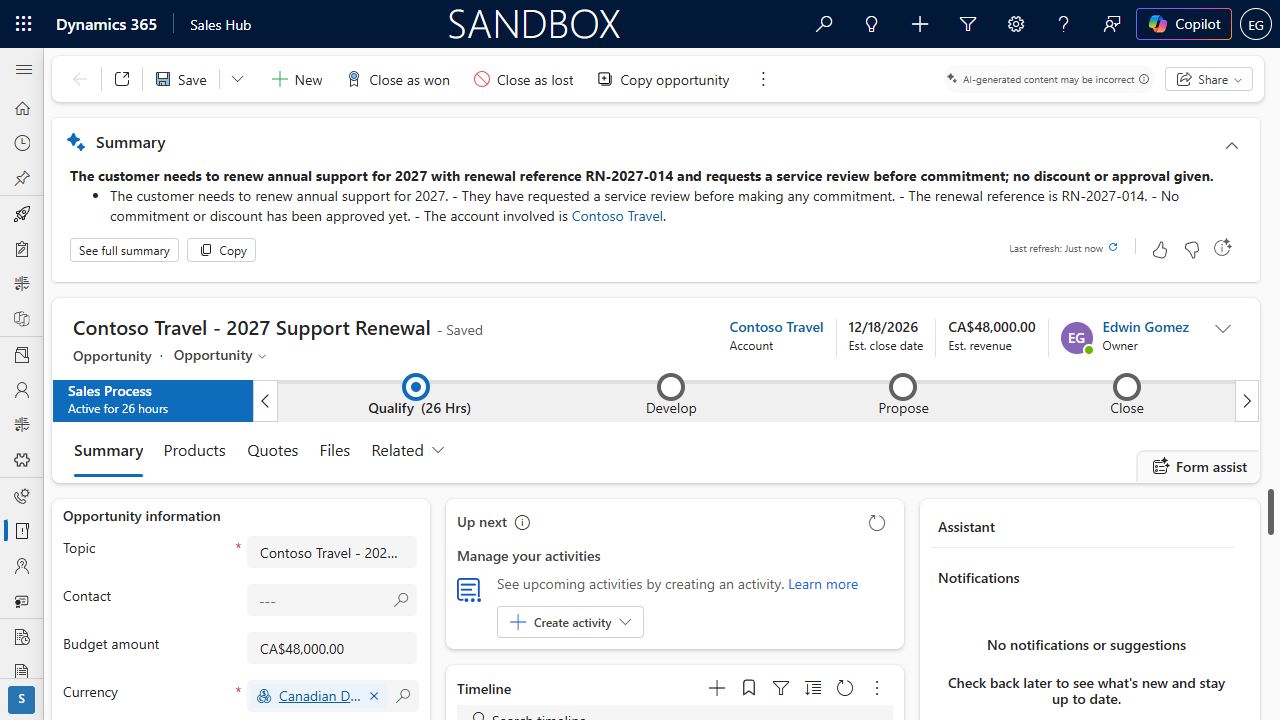
After confirmation, the agent reported success. We opened the opportunity directly in Dynamics and verified the December 18 date.
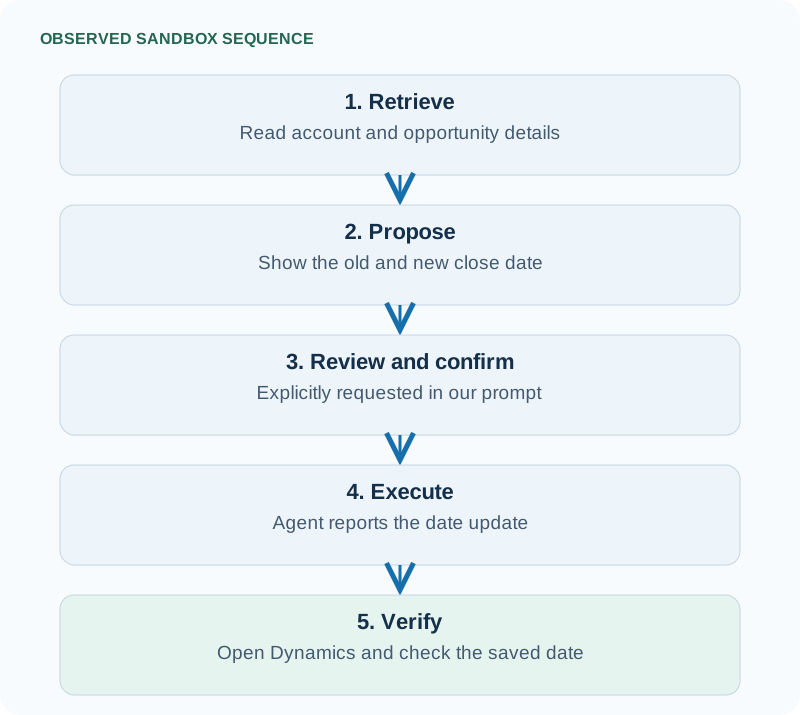
The larger renewal process would also include reviewing recent interactions, checking unresolved cases, preparing a briefing, and coordinating follow-up. Those steps remain illustrative in this example.
This test verified retrieval and one explicitly confirmed field update. It did not test custom validation, business approval workflows, or permission boundaries between users with different roles. The audit-history panel did not load, so we could not verify the audit trail. These results should not be treated as evidence that every customization or control behaves identically through another interface.
What should CRM users and business leaders take from this?
The useful question is which customer tasks become easier and more dependable when CRM capabilities are available within everyday work.
Start with one process, such as renewal preparation. Establish what information employees need, which changes they can make, and where review or formal approval is required.
A user confirming an update is not automatically equivalent to a manager approving a commercial decision. Likewise, controls attached to a Dynamics form cannot simply be assumed to apply through every interface. Microsoft’s implementation guidance
Access and cost also remain part of the business case. Requirements vary by experience: relevant Dynamics 365 licences, Copilot entitlement, administrator configuration, and usage-based billing may all affect the deployment. Microsoft documents both a Microsoft 365 Copilot licence and credit-based billing for Cowork. A different interface does not remove CRM licensing requirements or automatically lower implementation costs. Cowork requirements · Cowork administration
Measure whether employees prepare more accurate briefings, capture reliable updates, and complete follow-up consistently. Application usage alone will not tell the whole story.
Dedicated CRM applications will remain valuable for sustained case handling, pipeline reviews, complex transactions, and administration. Other tasks may fit naturally into Copilot or Teams.
The goal is dependable customer work: relevant information available when needed, clear responsibility for decisions, and confidence that agreed actions were completed.