
Based on a Business Central sandbox test on October 26, 2026
Business Central's support for Model Context Protocol (MCP) gives AI applications a common way to discover and use its business capabilities. For organizations using or evaluating Business Central, the practical question is when a separate AI connection adds value alongside its built-in Copilot. Microsoft's MCP overview
I tested the connection in a BC29 sandbox to see what MCP and its newer data-query tools add to integration design.
How MCP relates to an API
An API defines how software requests data or performs an operation. An integration might call a Business Central API to read customers or create a sales order.
MCP standardizes how an AI client discovers and invokes tools offered by a server. Tool descriptions and input schemas help the agent select operations and construct calls; they do not guarantee a correct choice. A tool can call an existing API underneath. MCP architecture
| Direct API integration | An agent using MCP |
|---|---|
| Integration logic determines which API operation to call. | The agent may select an exposed tool based on the request and tool metadata. |
| The consumer works with the API's contract. | The client uses MCP's common protocol and the server's tool schemas. |
| Well suited to a defined, repeatable workflow. | Useful when the next operation depends on the conversation and previous results. |
APIs can already support AI through function calling, schemas and custom adapters. MCP's contribution is a shared convention that compatible clients can use. I see its architectural value in the potential to reduce client-specific connection work, while retaining the underlying APIs and business logic.
What Business Central exposes
Two capabilities mattered in my test:
- API tools expose allowed operations on selected API objects. In Dynamic Tool Mode, an agent can search available operations, inspect their schemas and request execution.
- Data Query Tools let an agent inspect table metadata and submit AL query definitions for validation and read-only execution. Our test supplied query source to read ledger detail beyond the two selected API pages. Business Central MCP configuration
MCP supplies the common interface; Business Central's query feature adds the data-access capability.
What the sandbox test demonstrated
I connected VS Code with GitHub Copilot to BC29 / CRONUS Canada, Inc. The named MCP configuration initially exposed only customer and sales-invoice API reads, with edit tools blocked.
The question was to identify overdue customers and explain their balances. I used five sample customers and an explicit cutoff of January 1, 2027, matching the company's work date, with current remaining balances.
In ordinary use, a business user can ask Copilot a question in natural language. For example:
In CRONUS Canada, show overdue balances for customers 10000, 20000, 30000, 40000 and 50000 using January 1, 2027 as the cutoff. Explain the invoices and payments behind each balance. Only read data.
The agent may select exposed tools and build their arguments from the request; the user need not name MCP methods or parameters. Microsoft's Copilot instructions
That wording is illustrative and was not tested end to end. My controlled test used more prescriptive instructions prepared by Codex and entered into GitHub Copilot, with discovery, validation and execution separated. The actual technical test prompt documents those controls rather than a typical business-user request.
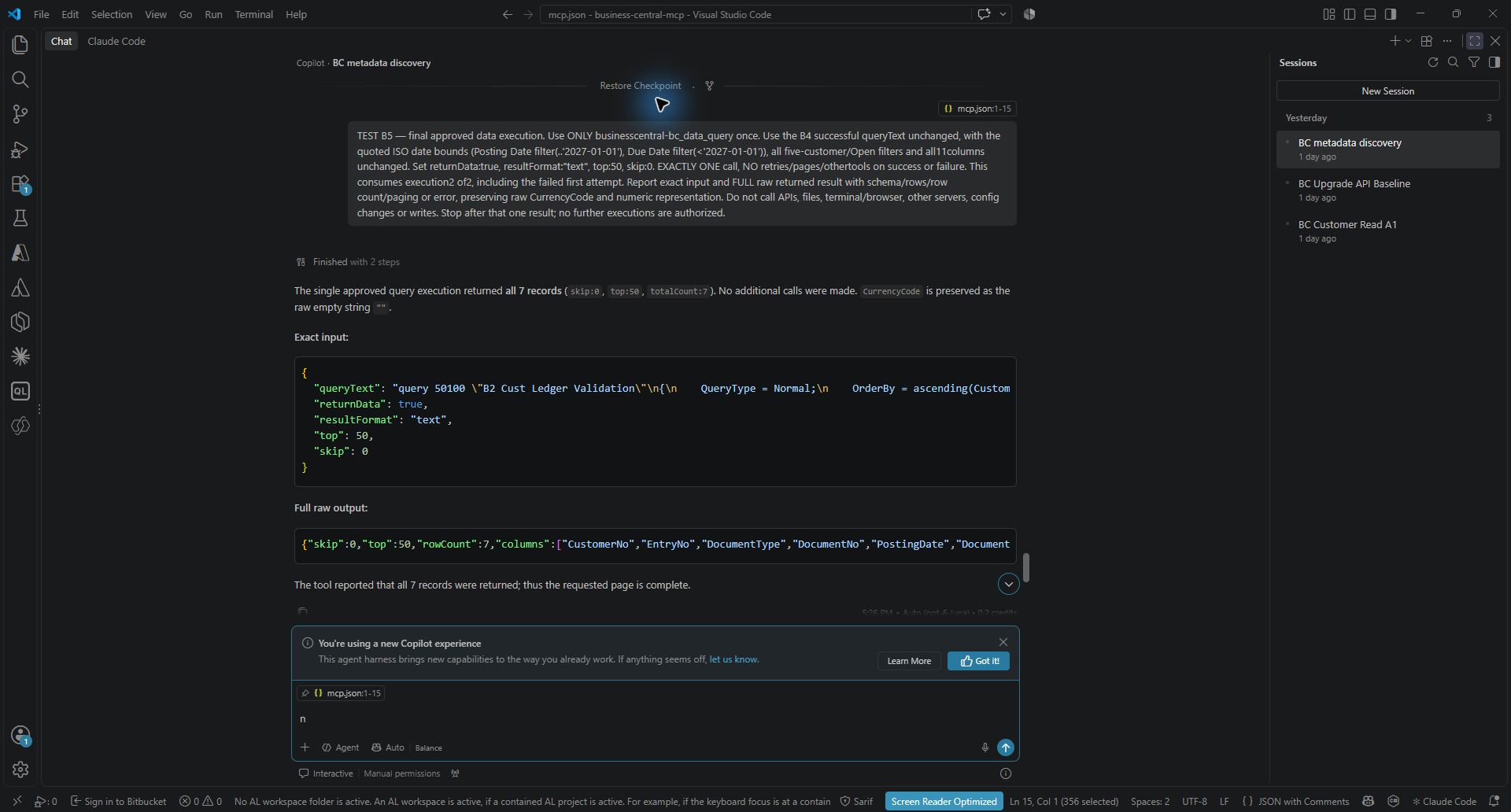
The useful finding was simple: one customer's open invoices did not tell the whole story. A 4,567.36 CAD payment already reduced the customer's balance but was missing from an invoice-only view.
After enabling Data Query Tools, the agent could discover the customer ledger table and query it without adding a ledger API to the configuration. The result included the payment alongside the invoices, explaining the difference. The returned values matched Business Central.
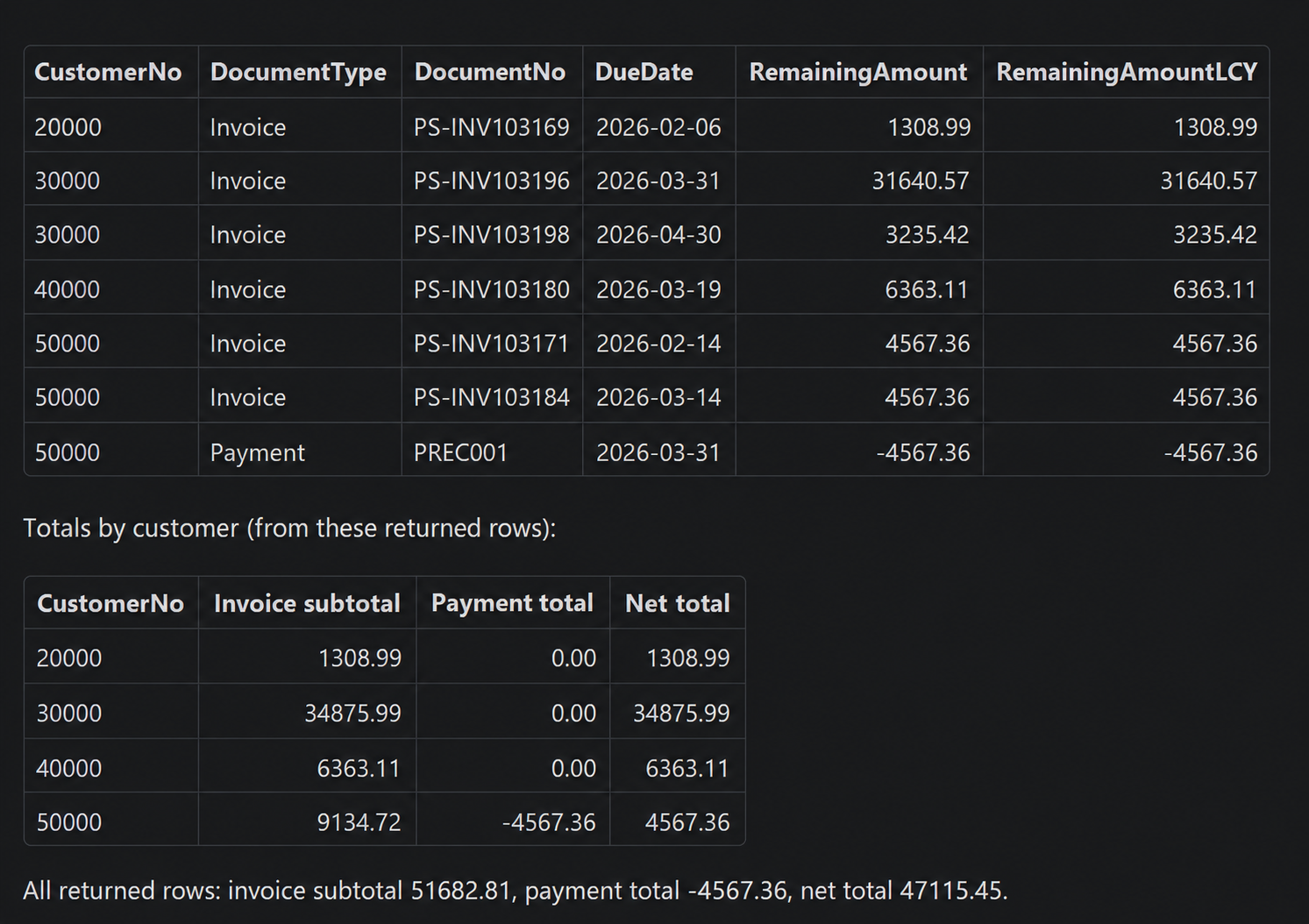
The customer API already returned the balance. What the query added was the explanation behind it. A suitable standard or custom API could also provide that detail; the practical benefit here was answering the question without first creating or adding that API.
One technical finding is worth keeping: a query passed compilation but failed at runtime on date-filter formatting. In my test environment, quoted ISO dates worked. Validation helped, but actual execution and result checking still mattered.
What changes for integration design
For predictable synchronization and transaction workflows, I would retain defined API contracts and explicit failure and retry handling. When an exploratory query becomes a recurring requirement, I would consider turning it into a curated, tested interface.
This flexibility also changes the access review. Two selected API pages do not describe the entire read surface once query tools are enabled. Effective read access depends on the exposed tools, enabled query capabilities and the signed-in user's BC permissions.
What this means for Business Central users
Business Central's built-in Copilot already supports finding, explaining and analyzing business data. If it meets a team's needs inside BC, a separate MCP connection may add little value. Microsoft's Copilot FAQ
MCP becomes useful when an organization wants a different AI client, a custom assistant or a tailored workflow involving several systems. Copilot and MCP can also work together: a custom Copilot Studio agent can use BC's MCP server. Microsoft's agent connection options
| Business need | Where I would start |
|---|---|
| Ask questions while working inside BC | Built-in Copilot, if it handles the task. |
| Use BC from another compatible AI application | An MCP connection to BC. |
| Coordinate BC with CRM and other applications using company-specific rules | A custom agent using MCP, connectors or APIs as appropriate. |
For example, a customer-service assistant could combine BC payment information, Dataverse support cases and shipment updates from a logistics system into one briefing. MCP could provide the BC tools; the other connections and workflow still need to be configured. The potential business benefit is less effort assembling information across systems, with a standard BC connection that compatible agents can reuse.
Our test proved that an external AI client could retrieve and explain BC data through MCP. It did not establish better answers or savings over built-in Copilot. The business reason to choose MCP is the need to bring Business Central into a chosen assistant or tailored business workflow.